Skip to content

Personal projectDesign challenge2025

Design Flows

Designing mission control for life on the Moon.

A mobile experience for discovering, assigning and tracking autonomous robots in a fictional lunar colony.

Context
Bending Spoons Design Challenge
Role
UX/UI Designer
Duration
2 weeks
Type
Concept Project
Deliverables
User Flow · Interaction Design · High-Fidelity UI
02The challenge

A complex mission. A simple interaction.

The brief imagined a parallel 2025, with humanity living in lunar colonies for over a decade. Daily life depends on Hexabots: multipurpose robots that collect resources, grow plants and explore craters.

The task was an app that lets colonists manage them simply and efficiently: find the Hexabots available, check where they are and what they're doing, assign missions, follow progress and receive updates, in a few taps.

Personas · provided in the brief

  • Explorers & ResearchersFocused on mission-critical work, often multitasking, and need to run experiments efficiently.
  • FamiliesNot tech-savvy. They rely on Hexabots for everyday tasks and need a simple, intuitive app.

Needs and behaviours · from the brief

  • 01Quick accessUsers check their Hexabots' status 7 to 10 times a day.
  • 02Clear statusReal-time updates have to be clear and easy to read.
  • 03Urgent tasksAbout 65% of users assign tasks in response to sudden needs, with no time to plan.
  • 04Mission trackingWhen several Hexabots work in the same area, each task must be easy to tell apart.
  • 05Voice controlMany users want hands-free control, in spacesuits or during manual work.
  • 06Harsh conditionsGloves and fogged helmets: the app must work with limited dexterity and little time.

Constraints

From brief to final screens
2 weeks
Maximum for the wireflow
12 screens
In high fidelity
3 screens
Brief, personas and supporting data
Provided
03Design goals

Designing for speed, clarity and control.

  1. 01Quick accessFind a robot, and the information you need about it, in as few steps as possible.
  2. 02Clear mission statusUnderstand at a glance what each Hexabot is doing and how far it has got.
  3. 03Flexible interactionSupport touch and voice, depending on the context and the user's hands.
04User flow

Mapping the experience before designing the screens.

The scenario from the brief: a research team in one of the colony's science domes is building a turbine prototype with a silicon 3D printer, but is missing the material to finish it. From the Home they check their Hexabots, quickly assign one to collect the resources, then follow it until it's back at the dome.

  1. Find HexabotFrom the Home to a map of the robots nearby
  2. Assign TaskPick an available robot, describe the task by touch or voice
  3. Track MissionPosition, progress and updates in one place
  4. CompleteThe robot collects the materials and returns to the dome
Helmet ID (Dynamic Island)UserPasswordLoginGlove mark (ID)Notifications (Dynamic Island)TitleModeFindHexabot 1Hexabot 2Notifications (Dynamic Island)<AssignAssignAssignHexabot 1, working…Hexabot 2, working…Coordinates (Dynamic Island)<Status + LocationName + iconsProgress trackerAssign a new taskSuggestionsTask 1Vocal command<Assign new taskSuggestionsCancelSaveHexabot real-time reportReport about missionReport about missionReport about missionReport about missionReport about missionReport about missionLoginHomeFind HexabotsMission trackerAssign taskHexabot report

Sign in with helmet ID or glove mark: no typing with gloves on.

Wireflow redrawn from the original · same six screens and connectionsScroll to explore the wireflow →
  • NavigationA bottom bar with a central voice button, so voice is one tap away from every main screen.
  • Main pathLogin → Home → Find Hexabots → Mission tracker → Assign task, with a real-time report reachable from the bar.
  • Login without typingHelmet ID and glove mark as alternatives to username and password, for users wearing a spacesuit.
  • Status always visibleThe Dynamic Island carries notifications and coordinates, so the mission stays in view on every screen.
  • Within 12 screensSix key screens mapped instead of twelve, keeping the flow focused on the scenario.
05Final interface

Three screens. One connected experience.

Each screen answers a moment of the scenario: checking, finding, following.

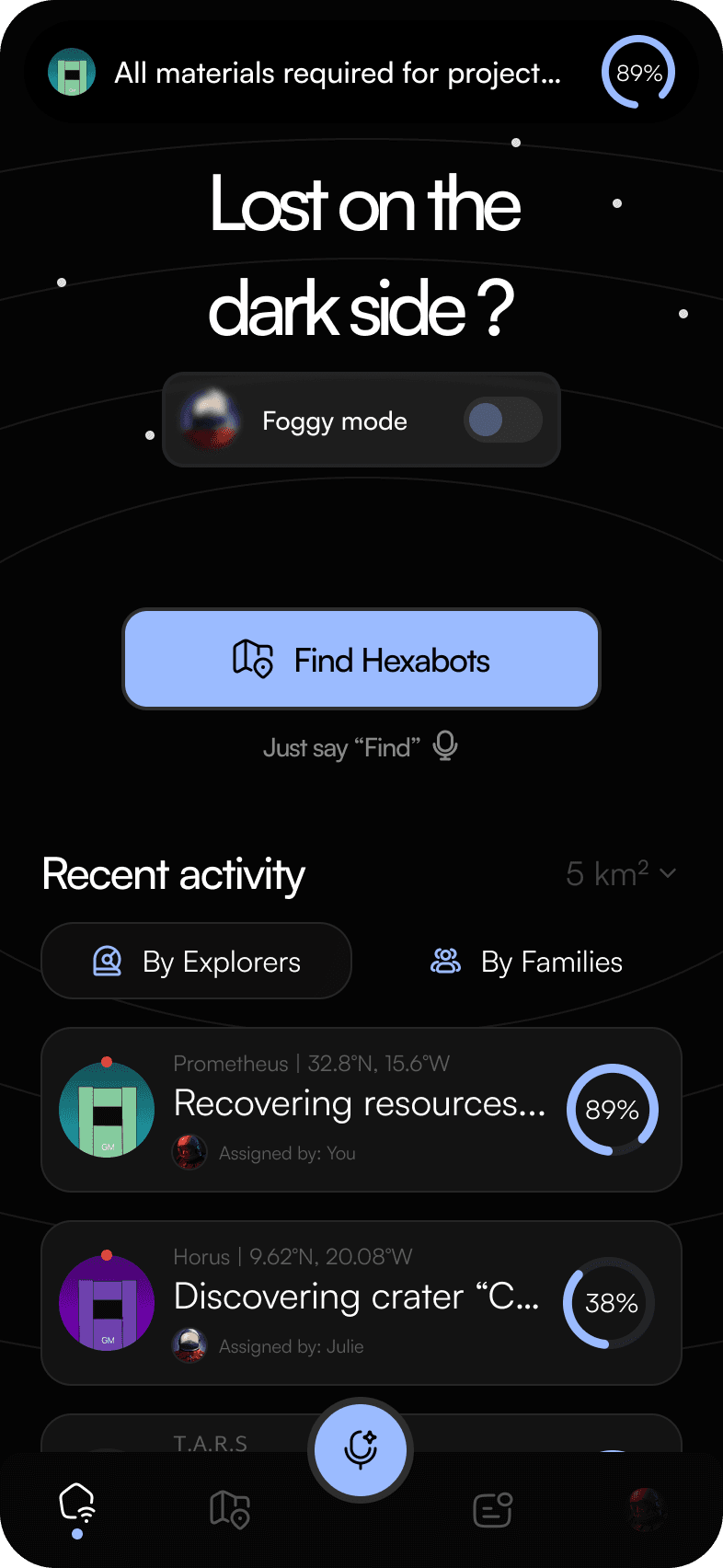
Home screen: live mission status at the top, a Find Hexabots button with a voice hint, and recent activity filtered by Explorers and Families.
01

Home

The problem

Users check on their Hexabots many times a day, and often need one urgently.

Design decisions

  1. 1Live status of the active mission at the top, in the Dynamic Island.
  2. 2A Foggy mode switch, for the brief's fogged-helmet condition.
  3. 3One primary action, Find Hexabots, also available by voice: “Just say ‘Find’”.
  4. 4Recent activity split by Explorers and Families, the two personas in the brief.
  5. 5Each Hexabot card shows name, coordinates, task, who assigned it and progress.
Mission status, always on top — Home
Mission status, always on top
Status at a glance — Home
Status at a glance
02

Find Hexabots

The problem

With several robots in the same area, users need to see at once which are free and which are busy.

Design decisions

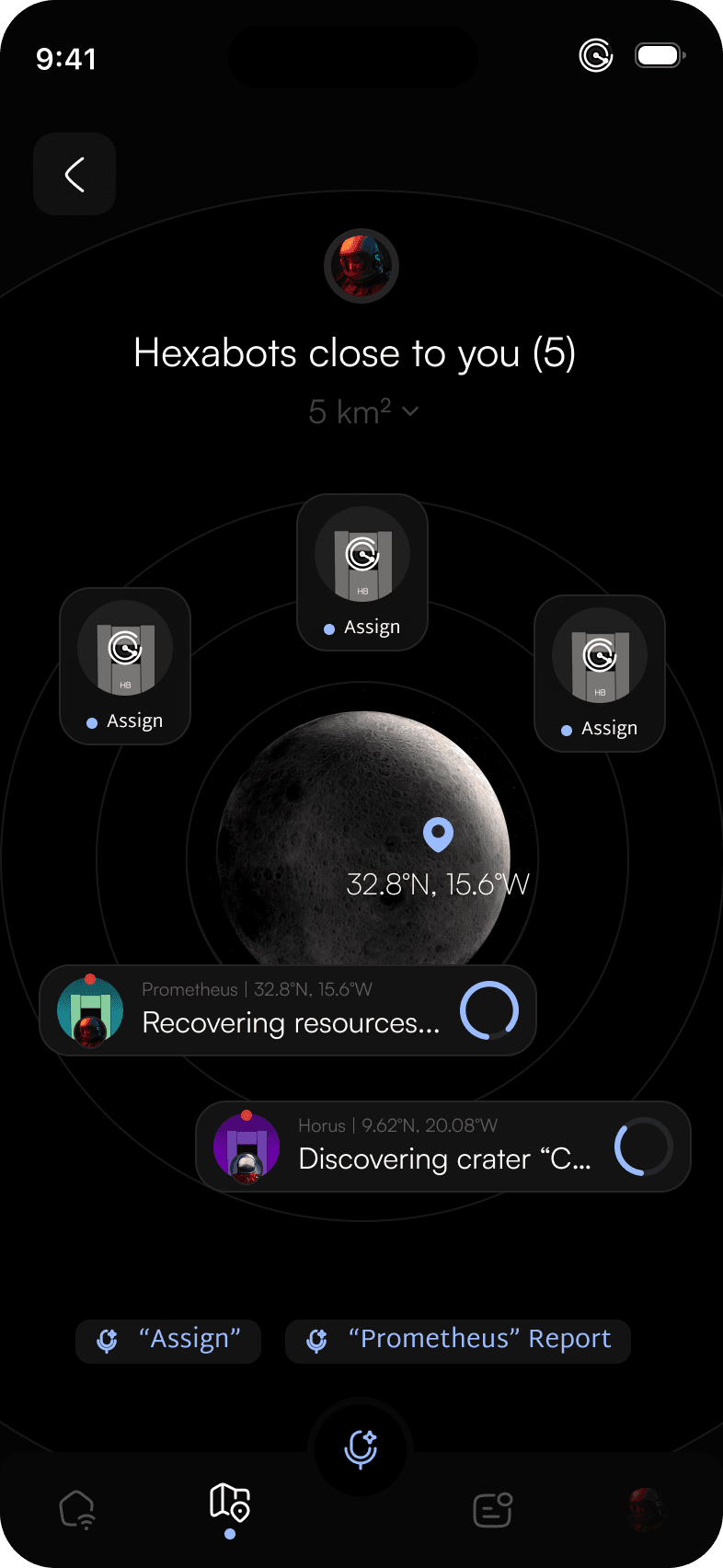
  1. 1Nearby Hexabots and how many there are, around the user's position.
  2. 2An adjustable search radius.
  3. 3Available robots can be assigned directly; busy ones show their current task and progress.
  4. 4Voice shortcuts for the most likely commands: “Assign”, “Prometheus” Report.
Voice shortcuts — Find Hexabots
Voice shortcuts
Find Hexabots screen: a radar around the user's position on the Moon, available Hexabots to assign and busy ones with their current task.
03

Mission tracker

The problem

Once a task is assigned, users need to follow it and react quickly when something changes.

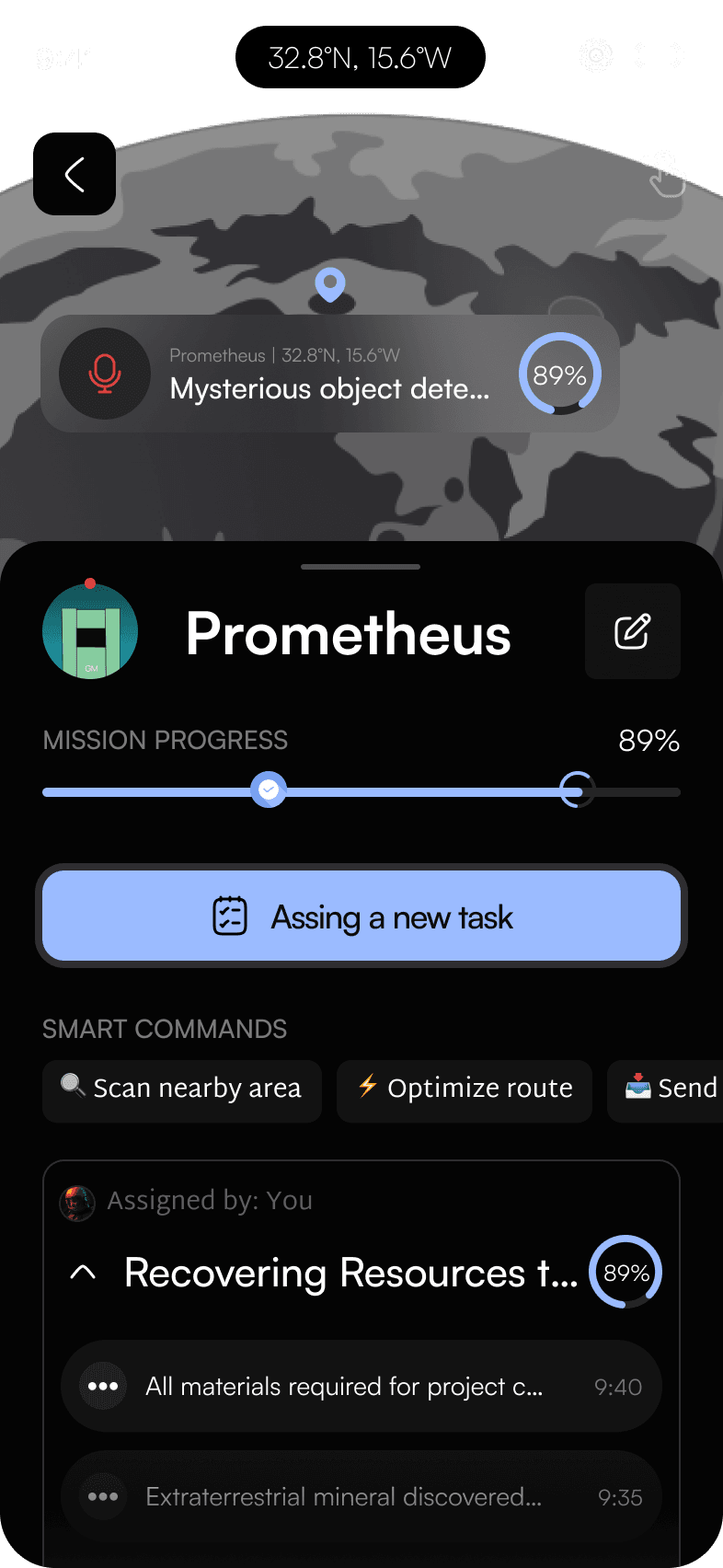
  1. 1The Hexabot's position on the map, with live coordinates.
  2. 2Voice control available on the map, for urgent commands.
Mission tracker screen: the Hexabot's position on the map, mission progress, a button to assign a new task and smart commands.
  1. 3Hexabots can be renamed and customised from the edit button.
  2. 4Mission progress with its steps, and a log of updates with timestamps.
  3. 5Assign a new task as the main action, with smart commands for urgent needs.
06Design details

Small details, consistent everywhere.

A few elements carry the whole experience. They come back on every screen, so what users learn once keeps working.

  • Hexabot iconsDesigned by me. Named Hexabots have their own colour, so robots working in the same area are easy to tell apart.

  • Robot statesAvailable robots show an Assign action. Busy ones show their task, position and progress.

  • One progress patternThe same ring shows progress on the Home, the map and the tracker.

  • Voice, one tap awayA central voice button in the bar, voice hints next to actions and spoken shortcuts.

07Learnings

A short challenge. A valuable learning experience.

Designing the flow and three screens from scratch in two weeks was a real challenge. The entry didn't win, and with more time I would have worked more carefully on the details across the whole app. It remains a project I learned a lot from.

  1. 01Reading the briefTurning personas, data and a fictional scenario into concrete requirements.
  2. 02Flows firstMapping the journey before the UI kept the three screens connected.
  3. 03Working within limitsTwo weeks and twelve screens meant choosing what really mattered.
  4. 04Interaction designDesigning touch and voice as two ways to do the same things.
  5. 05High-fidelity UITaking a concept to a polished, coherent visual language.
  6. 06Setting prioritiesNext time: more attention to details and edge cases beyond the main path.

A concept project for a design challenge. Not developed as a commercial product.

08Credits & next

From brief to interface, in two weeks.

Credits

Brief
Bending Spoons · Design Flows 2025
Hexabot icons
Luca Alfano
Additional icons
Hugeicons
Images
Unsplash / Envato Elements
Image authors
StrokeVorkz, Nick Brunner, Levi Stute
Next projectELAI Agent
→Contact

Let's create something meaningful.

Have an AI product, a complex UX challenge, or a design opportunity in mind? Let's talk.

Get in touch
Designed by me in Figma. Built with Next.js and AI.